For training on this box I paid the ROCm tax. For inference I skipped it, and the machine got simpler and faster. About 80 tokens a second, on a driver I never installed. A few months back I turned this same machine into a training rig, and the price of admission was ROCm on silicon AMD doesn’t list as supported. Kernel pins. HSA overrides. The low background dread of a driver stack that can wedge your whole box on the next update. The machine is a Framework Desktop built around a Ryzen AI Max+ 395, running Ubuntu 26.04 headless in my office. I reach it over SSH from the Mac on my desk, and whatever it writes syncs back a second later. This time I wanted the other half of it. Not training. Serving. A model that runs on that box and drafts all day, with no prompt of mine ever handed to a vendor’s API. The useful surprise: the tax I paid last time turned out to be optional. What follows is the whole build, in the order I did it, so you can run it on your own box. The training half of this same machine, the one that made me pay the ROCm tax, is a piece I have drafted but not yet published.
The idea and why LinkedIn posts were the test
I didn’t set out to build a LinkedIn tool. I set out to answer one question: can this box efficiently do real content work with nothing leaving the house.
The post writer was simply the proof of concept. It’s small, I can judge it in ten seconds, and it needs two hard things at once: a real voice, not a near one, and rules it can’t wriggle out of. Clear that bar and the pattern holds for the heavier work sitting behind it.
So I wrote the success bar down before I started. Everything below is me checking the boxes.
Nothing leaves the machine. No cloud model, no API key, not one prompt. If it can’t be private, it isn’t the thing I want.
It runs on the GPU over Vulkan, with no ROCm anywhere.
A topic goes in. A usable draft comes out.
A dumb, deterministic check enforces the voice rules, every time.
It comes back on its own after a reboot, no babysitting.
Five boxes. The rest of this is whether they got checked.
The box, and the one memory setting that makes it possible
The hardware: a Ryzen AI Max+ 395 (Strix Halo, the gfx1151 integrated GPU, which shows up as a Radeon 8060S), 128 GB of unified LPDDR5X, Ubuntu on kernel 7.0.
Unified memory is the whole reason a 20 GB model fits comfortably here. The CPU and GPU sit on one die and share one pool of memory. The catch is that the GPU only gets a large slice of that pool if you tell the firmware to carve one, and that’s two kernel parameters set in grub. Inside the quotes, never on their own line:
GRUB_CMDLINE_LINUX_DEFAULT="quiet splash amdgpu.gttsize=126976 ttm.pages_limit=32505856 iommu=pt"Then sudo update-grub and reboot. That gttsize=126976 is 124 GiB of headroom handed to the GPU. Confirm the driver sees the chip at all:
vulkaninfo --summaryOn my box that reports Radeon 8060S Graphics (RADV STRIX_HALO) on Mesa 26.1.4. If you don’t see a RADV device, stop here and fix the driver, because nothing downstream will work. (I got into the deeper memory math in The APU as GPU. For inference you only need this one setting.)
Vulkan, not ROCm
For training I needed PyTorch and PyTorch on this GPU meant ROCm. For inference I need neither. llama.cpp talks to the GPU through Vulkan, and the RADV driver that already ships with Mesa speaks Vulkan to this chip with nothing added. No extra kernel module. No version pin. Nothing that can strand the machine on a routine update. On a live server that runs other things, that restraint is the point. Install the Vulkan runtime and the build toolchain:
sudo apt install mesa-vulkan-drivers vulkan-tools git build-essential cmake ninja-build pkg-config libvulkan-dev libcurl4-openssl-dev glslang-tools spirv-tools spirv-headers glslcThen build llama.cpp from source. This part earns its keep:
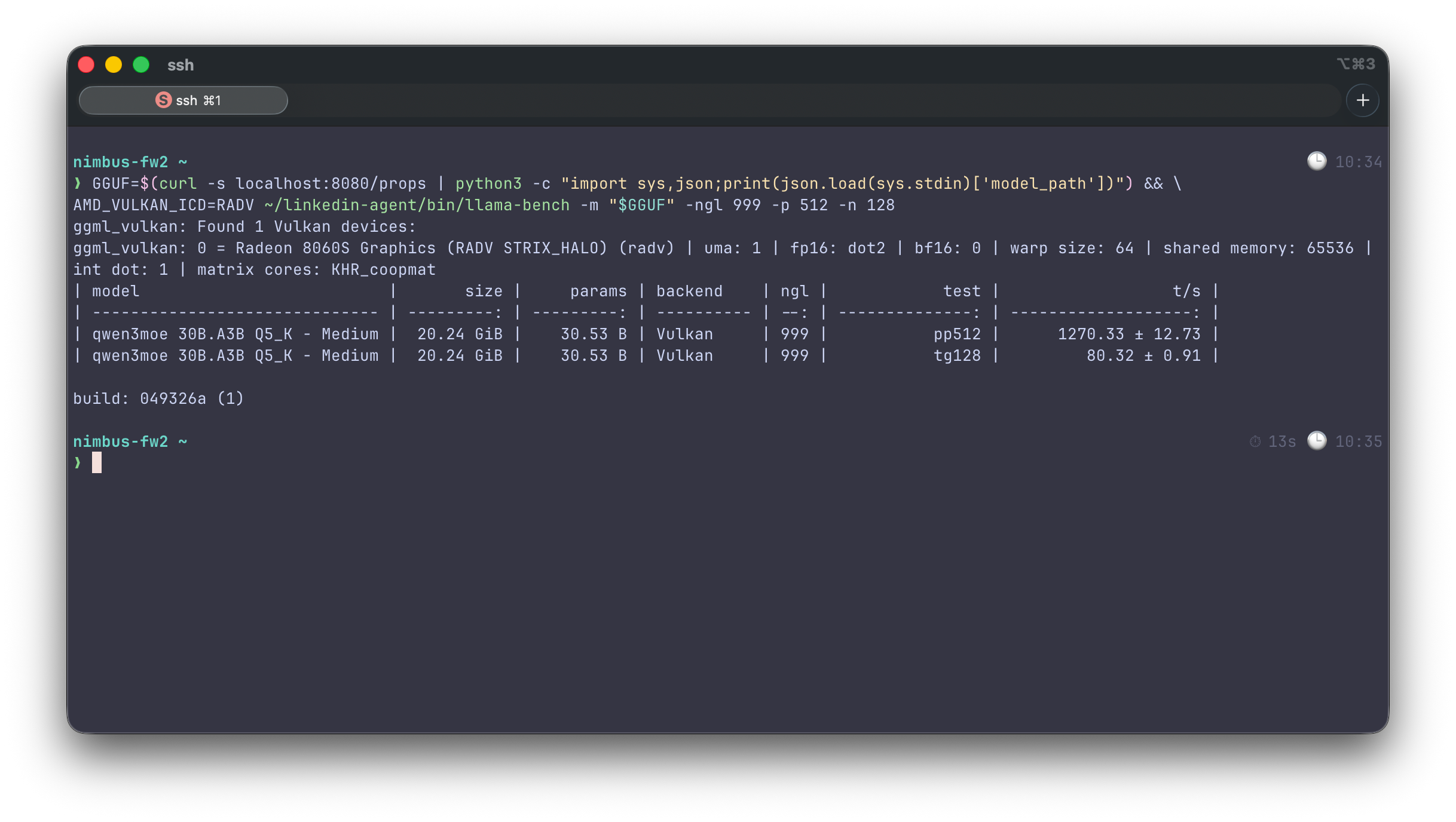
git clone --depth 1 https://github.com/ggml-org/llama.cpp && cmake -S llama.cpp -B llama.cpp/build -G Ninja -DGGML_VULKAN=ON -DCMAKE_BUILD_TYPE=Release -DLLAMA_CURL=ON && ninja -C llama.cpp/buildWhy source and not a prebuilt binary: the local build compiles the matrix-core shaders the driver exposes, and that fast path is most of the speed. A stock binary still loads and runs. It just leaves throughput on the floor. The proof that the fast path is live comes later, from the token rate: about 80 tokens a second, which a slower matmul path wouldn’t reach.
The model: Qwen3-30B-A3B (the part I left out the first time)
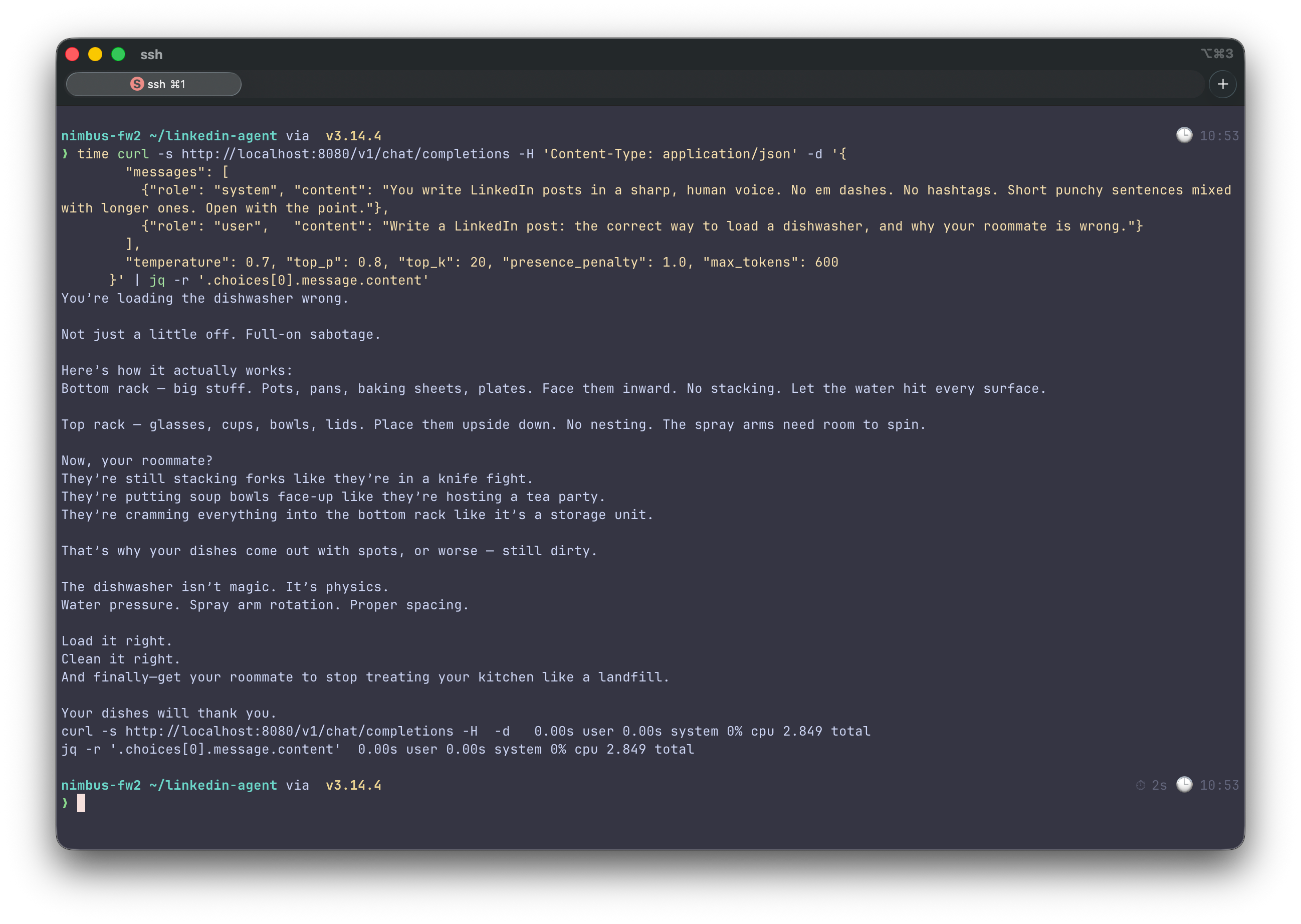
The model is Qwen3-30B-A3B-Instruct-2507, from Alibaba’s Qwen team, the July 2025 instruction-tuned refresh. It’s a mixture-of-experts model: 30.5 billion parameters in total, but only about 3 billion of them fire on any given token. That’s what the “A3B” in the name means, three billion active. That split is why it works on this hardware. Token speed on a shared-memory box is set by bandwidth, by how many bytes you read per token. A mixture-of-experts model reads like a 3B model and reasons like something far larger. I measure about 80 tokens a second on this box, which is a full post in a few seconds. The Instruct-2507 refresh is good at following instructions, which is exactly what voice mimicry leans on and it was trained with a 262,144-token (256K) context, so a pile of example posts fits without crowding anything out. The quantization is Unsloth’s dynamic GGUF, tagged UD-Q5_K_XL. On disk it’s 20.24 GiB. llama.cpp reports its type as Q5_K - Medium; the “dynamic” part is that Unsloth varies the bit-width per layer instead of quantizing everything to one width. I picked the dynamic Q5 over a plain Q4_K_M for a specific reason: some vanilla quants of this exact model loop, repeating a phrase until you kill the process and the dynamic quant plus a presence penalty is the documented fix. The whole model reference is one string:
-hf unsloth/Qwen3-30B-A3B-Instruct-2507-GGUF:UD-Q5_K_XL
It downloads to the Hugging Face cache on first launch. I checked that the repo and that exact quant existed before wiring it in, because an -hf string that 404s wastes a 20 GB download and a lot of patience.
Serving it, and making it come back
Here’s the launch line, with the flags that matter:
AMD_VULKAN_ICD=RADV ./bin/llama-server -hf unsloth/Qwen3-30B-A3B-Instruct-2507-GGUF:UD-Q5_K_XL --host 127.0.0.1 --port 8080 -c 16384 -ngl 999 --jinja --no-direct-io --cache-type-k q8_0 --cache-type-v q8_0AMD_VULKAN_ICD=RADV pins the driver so it can’t wander onto llvmpipe or AMDVLK. -ngl 999 puts every layer on the GPU. -c 16384 sets the working context. - jinja uses the model’s own chat template, and Qwen behaves worse without it. - cache-type-k q8_0 - cache-type-v q8_0 quantize the KV cache, the tested sweet spot on Vulkan. - host 127.0.0.1 keeps it on the box. And - no-direct-io is the one flag you’d never guess: without it the server refuses to load with an error about reaching the end of a file that’s perfectly intact, a known issue on this GPU family. A launch line you have to type is a demo. So the server runs as a user-level systemd service instead:
[Service]
Type=simple
Environment=AMD_VULKAN_ICD=RADV
ExecStart=%h/linkedin-agent/start_server.sh
TimeoutStartSec=0
Restart=on-failure

[Install]
WantedBy=default.target
systemctl --user enable --now llama-linkedin && loginctl enable-linger $USERThe linger line is what lets it run without me logged in, so it survives a full power cycle. TimeoutStartSec=0 keeps systemd from killing the very first launch while the 20 GB model downloads.
The voice system: three small files
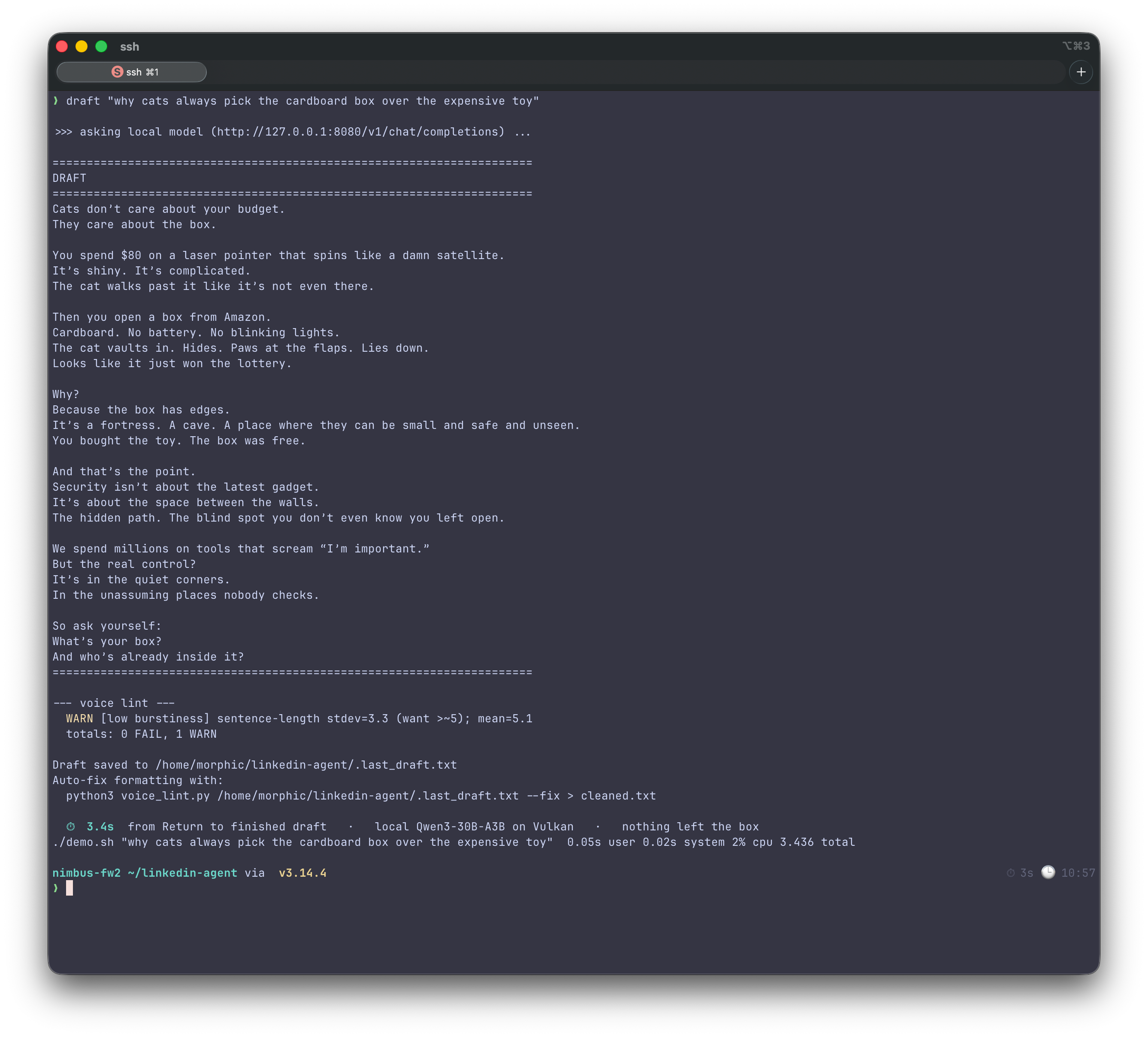
The model is the typist. These three files are the voice. system_prompt.txt holds the rules the model writes under: no em dashes, no Oxford comma, vary sentence length hard, open with the verdict not a warm-up, contractions throughout, a banned-word list, one three-part list maximum. It ends with an instruction to write only the post body, no preamble. posts/ holds my real, already-published LinkedIn posts, one per file. The client injects up to three of them at random as examples so the model matches my actual cadence instead of a generic one. Real posts only. Invented text in that folder poisons the output, and the model will happily learn a voice that isn’t mine. voice_lint.py is deliberately dumb. It reads a draft and counts things. Em dashes and banned words are hard failures that make it exit with an error. Oxford commas, low sentence-length variation, three same-length sentences in a row, more than one tidy triad: those come back as warnings to eyeball. A --fix mode auto-corrects the mechanical stuff, like turning an em dash into a spaced hyphen. draft.py is the glue. It reads the system prompt, grabs the anchor posts, sends your topic to the server with the sampling numbers Qwen’s packagers recommend (temperature 0.7, top-p 0.8, top-k 20, presence-penalty 1.0, that last one being the anti-loop measure), prints the draft, then runs the linter on it right there.
Running it…
This is the whole loop:
python3 draft.py "the real cost of shadow AI in enterprises"The draft prints and the linter’s report prints under it: failures in red, warnings in yellow. I generate a few, keep the best one, edit it by hand and post it myself. Nothing auto-posts. This drafts; a human ships. If a draft is good but has a mechanical slip, I clean it without touching the prose:
python3 voice_lint.py .last_draft.txt --fix > cleaned.txt
And the single biggest lever on quality isn’t a flag or a quant. It’s dropping more of my real posts into posts/. More anchors, closer voice.
How I know it works, and how it broke first
I don’t trust a setup I haven’t watched pass. So each piece has a check I actually ran:
curl -fsS http://127.0.0.1:8080/health           # {"status":"ok"}
curl -fsS http://127.0.0.1:8080/v1/models        # names the Qwen3-30B string
systemctl --user restart llama-linkedin          # comes back healthy in ~10s
The server’s own timings report about 80 tokens a second on generation, which is the number that proves the GPU path is live. A 30B model on CPU would crawl at a fraction of that. Getting there meant walking into a few walls, and this chip is newer than most of the software around it, so there were a few. Every one was a log, not a guess. The memory check lied, because the file that reports the GPU’s slice is readable only by root, so the obvious command prints permission denied; you read ttm.pages_limit instead. The build stopped dead on a header I’d never looked for, SPIRV-Headers, until I installed it. The model looped until the dynamic quant and the presence penalty settled it. And the server refused to load on nothing at all until --no-direct-io went in. None of those were in a tutorial. All of them were one honest read of server.log, journalctl or dmesg away.
The linter is the point
The rules the linter enforces are boring on purpose, and that’s the entire idea. A model can produce something shaped like my voice before it has earned it. Confidence reads as correctness. A clean paragraph reads as a true one. The linter is a cheap, dumb guard against believable-but-not-mine and the last call is still a person reading the thing out loud and cutting what’s wrong. The rules that police the model’s drafts are the same ones I hold this article to. I built the enforcement for a machine, then kept living under it.
The close
The box in my office will write anything I ask; deciding whether it’s true is the work I’m keeping.